
Document manipulation has traditionally been handled by backend microservices running heavy native binaries like Poppler, Ghostscript, or PDFKit. When a user needs to merge confidential invoices or extract specific pages from sensitive records, the standard web workflow requires uploading the entire raw file across the public internet to a remote cloud worker.
For enterprise environments, legal contracts, and sensitive personal records, routing unencrypted document streams through third-party cloud infrastructure increases the attack surface and complicates regulatory compliance obligations (such as GDPR cross-border data transfer assessments or CCPA service provider designations).
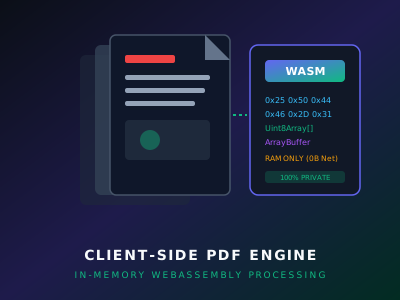
In building LS PDF—part of the LadeStack developer utility suite—we engineered a purely client-side document processing pipeline. By executing compiled WebAssembly (Wasm) engines against in-memory Uint8Array buffers, document transformations occur entirely in local browser RAM without transmitting document content to an external server.
The Zero-Upload Privacy Model
When handling sensitive documents, the strongest privacy guarantee is architectural: the server cannot leak data it never receives.
TRADITIONAL CLOUD PDF TOOL:
[Browser File Input] ──(Multi-MB Upload)──► [Cloud Server / DB] ──► [Disk Write] ──► [Process] ──► [Download]

LADESTACK LS PDF (WASM):
[Browser File Input] ──► [ArrayBuffer in RAM] ──► [WASM Execution Engine] ──► [Instant Local Download]
                                ▲
                                └─── 0 Document Bytes Transmitted Over Network
By keeping files local, users benefit from:
- Zero Network Transfer Overhead: Processing a 150 MB document is limited only by local CPU and RAM speed, avoiding slow 4G/5G upload bottlenecks.
- Reduced Data Exposure: Because document content never traverses external network endpoints or cloud storage buckets, organizations eliminate third-party server storage exposure for file payloads (though comprehensive compliance still requires endpoint security and organizational governance).
- Offline Document Processing: Once the web application bundle and its compiled WebAssembly modules are cached in the browser (via Service Workers or HTTP cache), document transformation routines execute locally without requiring an active internet connection.
In-Memory Binary Manipulation: The ArrayBuffer Pipeline
Web browsers expose the standard W3C FileReader and Blob APIs to read local files as raw byte streams. LS PDF interfaces with these APIs via typed arrays:
/**
 * Reads a local user file into an in-memory Uint8Array
 */
export async function readFileAsBinary(file: File): Promise<Uint8Array> {
  const arrayBuffer = await file.arrayBuffer();
  return new Uint8Array(arrayBuffer);
}
Once the byte array is loaded in memory, it is passed directly across the WebAssembly linear memory boundary using a shared memory pointer.
WebAssembly Memory Marshaling
To execute high-performance C++ or Rust document parsing routines inside the browser, the JavaScript host allocates memory within the WebAssembly module instance:
// Allocating buffer inside WebAssembly memory space
const fileData = await readFileAsBinary(uploadedFile);
const wasmMemory = wasmInstance.exports.memory as WebAssembly.Memory;

// Request memory allocation from WASM allocator
const ptr = wasmInstance.exports.allocate_buffer(fileData.length);
const memoryView = new Uint8Array(wasmMemory.buffer, ptr, fileData.length);

// Copy local byte buffer into WASM memory
memoryView.set(fileData);

// Trigger document transformation (e.g. merge, rotate, re-order)
const resultPtr = wasmInstance.exports.process_pdf(ptr, fileData.length);
By operating on linear memory offsets rather than serializing data through JSON or base64 strings, operations execute with near-native speed.
Memory Management & Garbage Collection Guardrails
Working with large PDF documents in browser memory requires strict lifecycle controls. Standard 32-bit WebAssembly (wasm32) operates within a 32-bit linear address space, imposing an architectural ceiling of 4 GB ($2^{32}$ bytes). In practice, browser engines (such as V8 in Chromium) historically enforce even stricter allocation limits per WebAssembly instance (frequently between 1 GB and 2 GB) to protect tab stability, alongside general browser process heap ceilings. If memory buffers are not explicitly reclaimed, executing sequential operations on multi-megabyte documents will trigger Out-Of-Memory (OOM) browser termination.
Explicit Pointer Deallocation
WebAssembly does not have automatic garbage collection for linear memory allocations. Therefore, every allocation must be explicitly freed:
try {
  const processedLength = wasmInstance.exports.get_result_length();
  const processedBytes = new Uint8Array(
    wasmMemory.buffer,
    resultPtr,
    processedLength
  ).slice(); // Clone into managed JS memory

  return new Blob([processedBytes], { type: 'application/pdf' });
} finally {
  // Explicitly free WASM heap buffers
  wasmInstance.exports.deallocate_buffer(ptr, fileData.length);
  wasmInstance.exports.deallocate_buffer(resultPtr, processedLength);
}
By cloning the resulting slice into a standard JavaScript Blob and immediately freeing the underlying WebAssembly heap space, memory spikes are reclaimed immediately.
Network Transit vs. Local Execution: Theoretical Latency Formulation
When evaluating client-side document processing, the primary structural advantage is eliminating the network transit phase. Under traditional cloud workflows, the physical upload and download of large document payloads introduce predictable network transmission delay.
Transmission Delay Formula
Network transmission duration is governed by standard data communication principles:
$\text{Transmission Delay } (T) = \frac{\text{Payload Size } (L)}{\text{Effective Bandwidth } (R)}$
For an illustrative 45 MB document merge operation ($45\text{ MB} = 360\text{ Megabits}$) over a hypothetical 15 Mbps mobile uplink:
$\text{Upload Transmission Delay} = \frac{360\text{ Mb}}{15\text{ Mbps}} = 24.0\text{ seconds}$
If the compiled result is approximately 11.25 MB (90 Megabits), the downstream transit requires an additional $6.0\text{ seconds}$ ($\frac{90\text{ Mb}}{15\text{ Mbps}}$), yielding 30.0 seconds of unavoidable network transmission time, independent of remote server queue wait times.
Architectural Latency Comparison
| Execution Model | Network Transit Delay (Illustrative 15 Mbps Channel) | Execution Boundary | Dominant Bottleneck |
|---|---|---|---|
| Remote Cloud Service | ~30.0s total (~24.0s upload + ~6.0s download) | Remote server queue & cloud storage | Upstream cellular bandwidth and server queue latency |
| Local Client-Side (WASM) | 0.0s (No payload transmitted) | In-memory ArrayBuffer in browser RAM | Client CPU speed and memory bus bandwidth |
Methodological Clarification: The cloud transit figures represent theoretical transmission delays calculated strictly from payload size and bandwidth parameters ($T = L / R$), not measured empirical turnaround times. For local WebAssembly execution, actual processing duration depends directly on device CPU architecture, document internal object complexity (vector graphics, embedded fonts, and compression streams), and available memory—avoiding network transmission entirely without asserting an arbitrary universal execution time.
Practical Applications in the LadeStack Suite
This client-side architecture powers the document tools within the LadeStack ecosystem:
- LS PDF Merger: Combine multiple contractual records into a single compiled document without cloud storage.
- LS PDF Page Splitter: Extract specific page ranges and download localized files in seconds.
- Client-Side Compression: Re-encode internal stream objects and remove redundant embedded metadata.
Explore the entire collection of privacy-first developer tools in the LadeStack Apps Directory or review our security philosophy on our Privacy Page.